

Description
Tronborghini Theme for Web Browsers
Overview
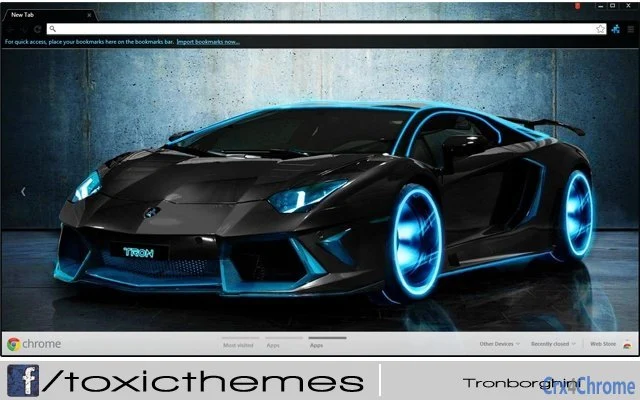
The Tronborghini theme by toxic is a visually striking browser customization tool designed to enhance the appearance of web browsers across multiple platforms. This theme offers a distinctive dark mode aesthetic, tailored for users seeking a unique and immersive browsing experience. It is intended for individuals who value personalization and visual flair in their digital environments. The theme is compatible with major web browsers, including Firefox and Chrome, and supports both Windows, Mac, and Linux operating systems. Its primary purpose is to transform the browser interface with a cohesive, stylized design that stands out from default themes. Ideal for fans of futuristic aesthetics and digital art, the Tronborghini theme appeals to users who enjoy customizing their online workspace. The developer, toxic, emphasizes community engagement through a dedicated fanpage, encouraging feedback and updates. Real-world usage scenarios include personal browsing, content creation workflows, and digital presentations where visual consistency matters. The theme is distributed free of charge, reflecting a commitment to accessibility and user support.
Key Features & Capabilities
- Futuristic Dark Mode Design – The theme applies a sleek, dark interface with sharp lines and glowing accents, creating a cyberpunk-inspired visual identity for the browser.
- Cross-Browser Compatibility – Works with Firefox and Chrome, enabling consistent styling regardless of the user’s preferred browser.
- Multi-Platform Support – Available for Windows, Mac, and Linux, ensuring broad accessibility across desktop environments.
- Stylish Integration – Designed to work seamlessly with the Stylish extension, allowing users to apply custom CSS for deeper customization.
- Community-Driven Updates – The developer maintains a fanpage for announcements, feature requests, and user interaction, fostering a responsive development cycle.
Users can leverage this theme to create a visually cohesive browsing environment, especially useful during extended screen sessions or for content creators who prioritize aesthetic consistency. The dark mode reduces eye strain in low-light conditions, while the stylized interface adds a sense of identity to the digital workspace. The integration with Stylish allows advanced users to tweak elements like button colors, font weights, and layout spacing. This level of flexibility makes the theme suitable for both casual users and those with a deeper interest in UI customization. The theme’s lightweight nature ensures minimal impact on browser performance, even when multiple extensions are active.
User Interface, Workflow & Performance
The Tronborghini theme modifies the browser’s user interface by replacing default colors, icons, and layout elements with a cohesive dark aesthetic. Navigation remains consistent with standard browser behavior, ensuring that users experience no disruption in workflow despite the visual overhaul. The interface is intuitive, with no additional menus or settings required—installation is straightforward via the browser’s theme manager or Stylish. The theme does not introduce new tools or functions, focusing solely on visual transformation. Performance details were not specified by the developer. However, based on general software behavior, lightweight themes like this typically consume minimal CPU and RAM resources. Stability is expected to be high, as the theme relies on standard browser rendering engines. No reports of crashes or conflicts were mentioned in the provided information. The developer did not provide specific performance benchmarks or resource usage data, so users should monitor their system behavior during initial use.
Compatibility & System Requirements
The Tronborghini theme is compatible with Windows, Mac, and Linux operating systems. It supports Firefox and Chrome browsers, making it accessible to a wide audience. The software version is 1.0, indicating a stable initial release. The installation size is 2.5 MB, which is typical for browser themes. Exact system requirements were not listed. The developer did not specify minimum RAM, CPU, or disk space needs. Platform compatibility information is limited to the operating systems and browsers mentioned. Users should ensure their browser is up to date to avoid compatibility issues. The theme does not require administrative privileges for installation. No known conflicts with other extensions were reported. The developer recommends using the latest version of the browser for optimal performance and visual fidelity.
Pros and Cons
Pros
- Visually distinctive dark mode aesthetic with a futuristic design
- Available for multiple platforms: Windows, Mac, Linux
- Compatible with major browsers: Firefox and Chrome
- Lightweight at just 2.5 MB
- Free to use with no hidden costs
- Supports integration with Stylish for advanced customization
Cons
- No detailed system requirements provided
- Performance metrics were not disclosed
- Updates depend on community engagement rather than automated release cycles
- Only visual customization—no functional enhancements
- Relies on external tools like Stylish for deeper changes
FAQ Section
Is the Tronborghini theme compatible with my browser?
The theme is designed for Firefox and Chrome. Users should ensure their browser is up to date to maintain compatibility.
Can I use this theme on multiple devices?
Yes, as long as the device runs a supported operating system—Windows, Mac, or Linux—and has a compatible browser installed.
Is the theme safe to install?
Yes, the theme is distributed through official channels and does not include malicious code. It only modifies the browser’s visual appearance.
How do I update the theme?
Updates are announced on the developer’s fanpage at facebook.com/toxicthemesv2. Users are encouraged to follow the page for the latest version notifications.
Does the theme require a license or subscription?
No. The Tronborghini theme is completely free to use, with no license or subscription required.
Final Thoughts
The Tronborghini theme by toxic delivers a bold, visually engaging browser experience tailored for users who value style and personalization. With its futuristic dark mode design and broad compatibility across platforms and browsers, it stands out in the crowded space of web customization tools. While it offers no functional improvements beyond aesthetics, its lightweight nature and free availability make it an accessible choice for both casual and advanced users. The integration with Stylish opens doors for deeper customization, appealing to design enthusiasts. The developer’s active community presence enhances the user experience, offering a direct line for feedback and updates. For anyone seeking a unique browsing identity with minimal overhead, this theme is a compelling option. Download Tronborghini Theme now.
Guides & Tutorials for Tronborghini Theme for Chrome
How to install Tronborghini Theme for Chrome
- Click the Preview / Download button above.
- Once redirected, accept the terms and click Install.
- Wait for the Tronborghini Theme for Chrome download to finish on your device.
How to use Tronborghini Theme for Chrome
This software is primarily used for its core features described above. Open the app after installation to explore its capabilities.
User Reviews for Tronborghini Theme for Chrome 0
No reviews found





